NFV Issue Tracker
The ETSI Issue Tracker allows to report feedback on a ETSI NFV public DRAFTs available in the NFV Open Area. (this area only contains the ISG NFV drafts which have been made public, i.e. most of them).
There are 2 ways of accessing the ETSI Issue Tracker:
- go to the ETSI Issue Tracker home page, choose project "NFV Specifications" and the sub-project for the corresponding draft (upper right corner).
- Click on one of the direct links in the table below
In both cases your will first have to login or create yourself an account (see instructions further down)
| Draft Reference | view scope & schedule | Direct link to Issue Tracker |
|---|---|---|
| EVE001 "Hypervisor Rqmts spec" | EVE001 details | EVE001 issue tracker |
| EVE002 "MEF Use Cases report" | EVE002 details | EVE002 issue tracker |
| EVE003 "NFVI Node Arch report" | EVE003 details | EVE003 issue tracker |
| EVE004 "Virtualisation technologies Report" | EVE004 details | EVE004 issue tracker |
| EVE005 "SDN usage in NFV Report" | EVE005 details | EVE005 issue tracker |
| IFA001 "Acceleration 1 - UCs report" | IFA001 details | IFA001 issue tracker |
| IFA002 "Acceleration 2 - VNF Intface Spec" | IFA002 details | IFA002 issue tracker |
| IFA003 "Acceleration 3 - vSwitch Spec" | IFA003 details | IFA003 issue tracker |
| IFA004 "Acceleration 4 - Mgmt aspects Spec" | IFA004 details | IFA004 issue tracker |
| IFA005 "Or-Vi ref point Spec" | IFA005 details | IFA005 issue tracker |
| IFA006 "Vi-Vnfm ref point Spec" | IFA006 details | IFA006 issue tracker |
| IFA007 "Or-Vnfm ref point Spec" | IFA007 details | IFA007 issue tracker |
| IFA008 "Ve-Vnfm ref point Spec" | IFA008 details | IFA008 issue tracker |
| IFA009 "MANO architectural options report" | IFA009 details | IFA009 issue tracker |
| IFA010 "MANO Functional Rqmts Spec" | IFA010 details | IFA010 issue tracker |
| IFA011 "VNF Packaging Spec" | IFA011 details | IFA011 issue tracker |
| IFA012 "Os-Ma-Nfvo ref point Spec - svc mgmt & info model" | IFA012 details | IFA012 issue tracker |
| IFA013 "Os-Ma-Nfvo ref point Spec - info model" | IFA013 details | IFA013 issue tracker |
| IFA014 "Network Service Templates Specification" | IFA014 details | IFA014 issue tracker |
| REL002 "Scalable Arch for Reliability Report" | REL002 details | REL002 issue tracker |
| REL003 "E2E reliability models report" | REL003 details | REL003 issue tracker |
| REL004 "Active monitoring & failure detection report" | REL004 details | REL004 issue tracker |
| SEC002 "Security features in mgmt sofware report" | SEC002 details | SEC002 issue tracker |
| SEC004 "LI report" | SEC004 details | SEC004 issue tracker |
| SEC005 "Certificate mgmt report" | SEC005 details | SEC005 issue tracker |
| SEC006 "Sec & Regulation report" | SEC006 details | SEC006 issue tracker |
| SEC007 "NFV Attestation report" | SEC007 details | SEC007 issue tracker |
| SEC008 "Security Monitoring report" | SEC008 details | SEC008 issue tracker |
| SEC009 "UCs for multi-layer host admin" | SEC009 details | SEC009 issue tracker |
| TST001 "Pre-deployment Validation report" | TST001 details | TST001 issue tracker |
| TST002 "Iop Testing Methodology report" | TST002 details | TST002 issue tracker |
Login to the Issue Tracker
Login with EOL: NFV members and participants can login to the ETSI NFV Issue Tracker with their ETSI OnLine (EOL) account (used to log into the ETSI Portal).
Create local account: The ETSI NFV Issue Tracker is also open to the general public: creating a local account only requires a username and a valid e-mail address, which is verified in the process.
New accounts have a "Reporter" role by default, which allows to submit new issues and view public issues.

Submit a new Issue
Connect to the ETSI Issue Tracker and login. On the main screen choose project "NFV Specifications" and the sub-project for the corresponding GS document
Before submitting a new issue, please check that
- the issue still exists in the latest version of the respective GS document, and
- the issue has not yet been reported by someone else. If the latter is the case, please add a comment to the existing issue rather than reporting a new one.
To submit a new issue:
- On the main screen choose project "NFV Specifications" and the sub-project for the corresponding GS document and then click "Report Issue".

- In the form, choose the most appropriate category for the new issue (see table below):
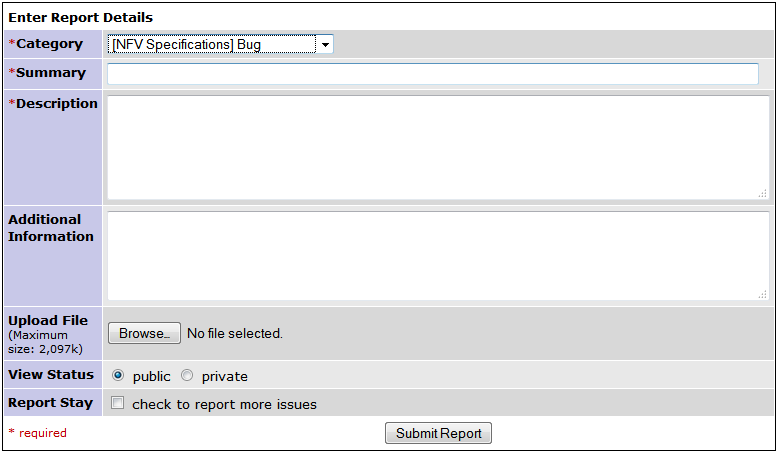
- Select the latest version of the GS document that contains the issue.
- Provide a descriptive one-line summary of the issue.
- Provide a detailed description of the issue: What specific issue did you encounter and where? What would you have expected to find instead?
- Optionally, provide additional information. This is the field to put references to external documents, if any.
- Keep the "View Status" as "public"
- Click "Submit Report".


Issue categories:
| Category | Semantic |
|---|---|
| Bug | Some aspect of the spec cannot be implemented as described. |
| Clarification | Some aspect of the spec is ambiguous or unclear. |
| Feature Gap | The specs are missing a feature (e.g. an operation, parameter) without which the described features cannot be implemented. |